Still using Spark Classic as your daily driver? It's a great email client — we built it that way. If your current setup works, there’s no rush to change.
But if you’d like to move through email faster, stay focused, or use the same Spark experience on both Mac and Windows, the new Spark picks up where Classic left off: same foundations, more ways to stay efficient — without rebuilding your workflow from scratch.
While Spark Classic is still supported, it’s no longer where we ship new features and improvements. The new Spark receives frequent updates based on customer feedback, so the version you try today will keep getting better over time.
Here's what to expect if you're considering the switch.
Make your inbox work the way you do
The new Spark gives you more control over how your inbox looks and behaves, starting with three inbox views to choose from. Simple List is essentially your Classic Inbox — one chronological list, most recent up top. Unread Cards is the standard Smart Inbox, with unread emails organized into sections like People, Notifications, and Newsletters. And Focused List is new: It builds on Smart Inbox by surfacing prioritized, pinned, and personal emails first, while hiding processed emails so you're only looking at what still needs attention.
Beyond views, you can configure layout to match how you like to work. Choose between Split View and Full Screen; compose emails in a new window, in full screen, or in a compact view; expand or collapse the sidebar. If you're migrating from Spark Classic, your existing layout preferences transfer automatically — so the app feels familiar from the first time you open it.
Spark Plus unlocks additional ways to keep your inbox tidy: priority status for specific senders, screening for unknown senders, muting noisy threads, and grouping emails by sender or domain.
Move through email faster
Spark Classic users already know how to move quickly — you've invested time in perfecting your workflow. The new Spark preserves those habits and adds a few ways to pick up speed. In fact, Spark users report saving 45% more time than Spark Classic users*.
Mark as Done gives you a faster way to clear what you've handled. When you've dealt with an email, mark it Done to move it out of your inbox and into your Archive folder. If there's new activity on that thread, it resurfaces automatically. Work through emails one at a time or clear them in batches.
Command Center puts every action in one place. Press ⌘ + K (CTRL + K on Windows) and type what you want to do — no memorizing shortcuts, no hunting through menus. It's the fastest way to do almost anything in Spark.
Your existing shortcuts, swipes, and smart folders work the same way they do in Spark Classic. When you migrate your settings, they transfer automatically — so the muscle memory you've built stays intact.
Write better emails in less time
The new Spark offers a modern editing experience, so you can draft more impactful emails.
The inline editor supports faster formatting — use header styles, paste hyperlinks, and insert tables, images, GIFs, and thumbnails — so you can communicate more complex ideas without switching apps.
If you're on Plus or Pro, Spark +AI can help you draft, expand, proofread, rephrase, or translate. It works from your existing templates too, expanding them based on the context of the thread. It's designed to reduce the time you spend rewriting the same kinds of emails, while making sure they still sound like you.
Let AI handle the busywork
We’ve invested in AI to take over the most frustrating parts of email — re-reading long threads, chasing action items, and tidying up notes.
Meeting Notes transcribes and summarizes your calls so you can focus on the conversation. Summaries include key points, action items, and owners. After a meeting, share a link to the notes (no Spark account required to view) or email the summary to attendees.
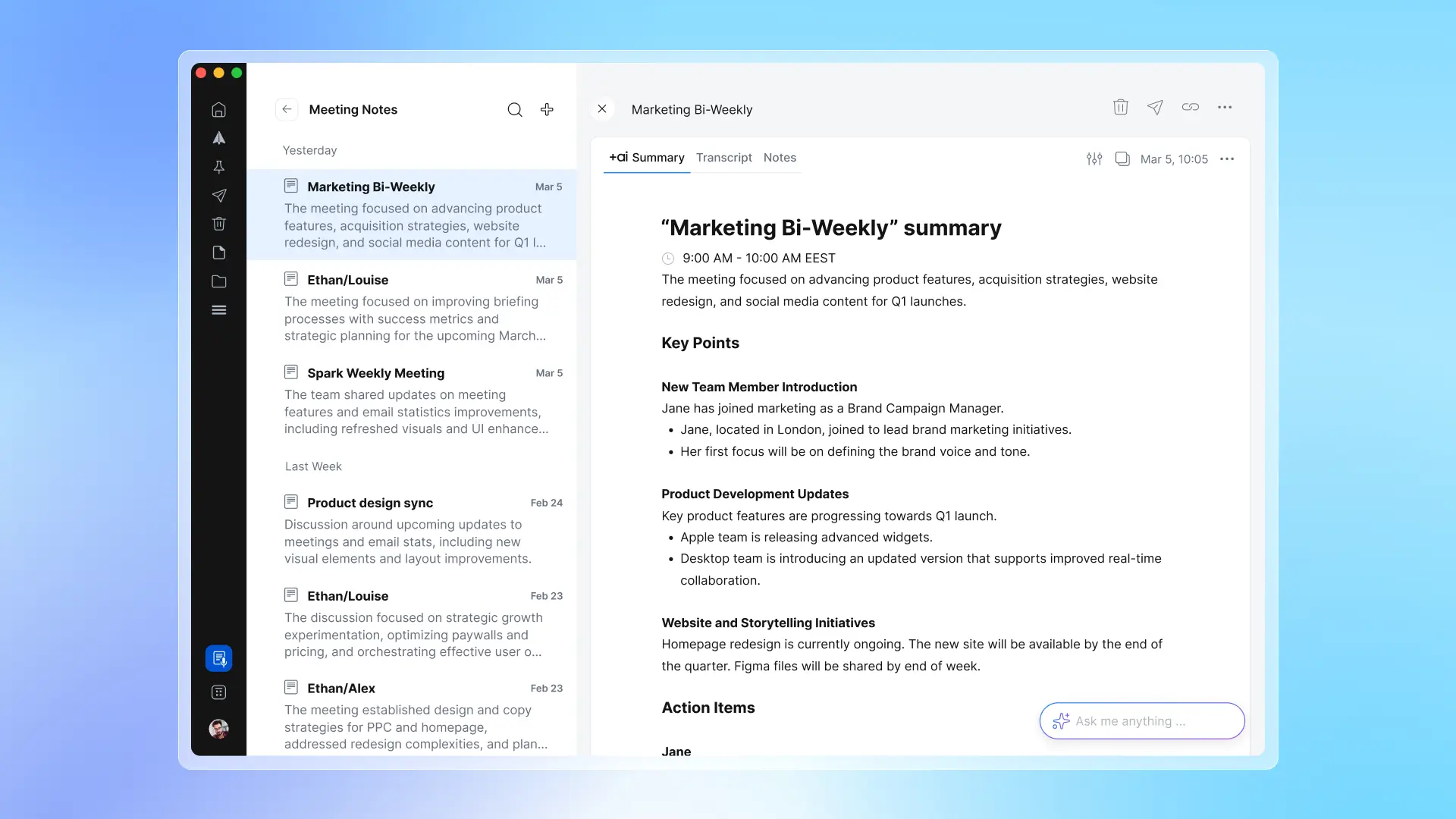
Summaries and translation help you decode long threads quickly. Summarize any email in a short, detailed, or bulleted format. Translate messages inline so they're easier to read.
AI Assistant finds, summarizes, and takes action across your accounts, emails, attachments, calendar, and meeting notes. It’s as easy as asking a question.
These features are available on our paid plans. AI in Spark is optional, disabled by default, and user data is never used to train models. You can learn more about how we use AI in our Privacy Policy and read more about email privacy principles in our knowledge base.
Keep email connected to everything else
Email doesn't happen in isolation — it connects to meetings, scheduling, and tools you're already using. The new Spark keeps more of that in one place so you're not constantly switching apps.
Calendar support now includes Google, Exchange, Microsoft 365, Outlook, and iCloud — all visible alongside your inbox.
Meeting pop-ups help you join every call on time. Pair them with Meeting Notes to start transcribing as soon as you join.
Meet With lets you check colleagues' availability without leaving Spark, so you can find a time that works without the back-and-forth.
Integrations now include Microsoft Teams alongside Google Meet and Zoom.
Work better as a team
Spark for Teams helps simplify communication, coordination, and follow through for your whole team. While Spark Classic already supports private comments, team templates, Shared Inboxes, and assignments, the new version makes collaboration come alive.
Read Statuses let you know when others — whether it’s people from your team, clients, or potential customers — read your emails, so you can follow up at the perfect time.
Advanced integrations extend email into the tools your team already uses. Teams on Plus can connect Spark to Slack and Notion; Teams on Pro will be able to connect to HubSpot and other CRMs to log emails, sync contacts, and keep meeting notes organized alongside deals.
Quick compare: Spark Classic vs. the new Spark
| Capabilities |
Spark Classic |
The new Spark |
| Inbox views |
Smart Inbox, Classic Inbox |
Smart Inbox (Focused List or Unread Cards) and Classic Inbox (Simple List) |
| Platform support |
macOS |
macOS + Windows |
| Email composer |
Basic editor |
Inline editor, image formatting, GIF support, media embeds, inline tables |
| Inbox prioritization |
Pinning, Blocking, Mark as Read |
All Classic features + Mark as Done, Set Aside, Priority Senders, Gatekeeper, Grouping |
| Follow-up management |
Snooze, Reminders |
All Classic features + Read Statuses |
| Calendar |
Google, Exchange, Microsoft 365, iCloud |
Google, Exchange, Microsoft 365, Outlook, iCloud |
| AI-powered support |
None |
Writing assistance, summaries, translation, AI templates, AI Assistant |
| Meeting notes |
None |
Transcription, AI summaries, shareable notes |
| Team collaboration |
Private comments, shared templates, drafts, assignments, team management |
All Classic features + mentions in composer |
| Shared Inbox |
Gmail |
Gmail, Microsoft 365, Outlook, IMAP |
| Services and Integrations |
15 (Reminders, Things, Evernote) |
All Classic integrations + Slack, Microsoft Teams, Notion, HubSpot |
| Updates and improvements |
Occasional maintenance and bug fixes |
Frequent updates with improvements and new features |
Skip the setup — get started right away
If you're switching from Spark Classic, there's nothing to relearn. Just install the app, connect your account, and you’ll be offered a choice to transfer your preferences, settings, shortcuts, swipes, and more. Everything that makes Spark uniquely yours comes with you.
Want to test it first? Run both apps side by side and see how the new Spark feels with your real setup. If it’s not the right fit, Spark Classic stays installed — you can return to it anytime.
Download the new Spark
*Results based on a survey of 20,000 active Spark users. "Time saved" represents individual user estimates of their own experience and may vary depending on email volume, feature usage, and individual workflows
 The Readdle Team