Every morning started the same way. Scroll the whole mailbox. Work out what was new. Separate the escalations from the conversations already in progress. Flag what was urgent. And only then — after all of that — start replying.
By the time Artiom finished sorting, he had spent the freshest part of his day on data entry. About forty minutes of it, before he could help a single person.
Artiom works in customer success at Spark. His job is the personal layer: the key accounts, the escalated threads, the ongoing relationships he keeps close. He handles those one-to-one from his own mailbox. It feels like a person, because it is one.
But a personal mailbox fills up like any other. Dozens of threads a day, every one of them something he chose to handle himself. And the hard part was never the answering. It was the sorting that had to happen before he could answer.
Then he handed the sorting to an agent, connected to his inbox through Spark CLI. He kept the part that needs him. And he didn't have to learn a new system to do it — he kept his own.
The sorting comes first
The cost of a busy inbox isn't writing the responses. It's figuring out which responses to write, in what order, with what context. That sorting happens before the real work can start, and it happens every day.
Artiom already had a good system for it — folders he'd built over years: Need Reply, Demo Request, Escalated to QA, Beta Feedback, Feature Request, and the rest. The folders worked. Keeping them current by hand was the cost. What he wanted was his own system, maintained for him.
That's what Spark CLI does. It connects an AI agent to the inbox you already keep in Spark, reading from Spark Desktop. It works with every account you've added — Gmail, Outlook, iCloud, Yahoo, and any IMAP or EWS account — through one connection. It doesn't impose a method. It runs yours.
The inbox that sorts itself
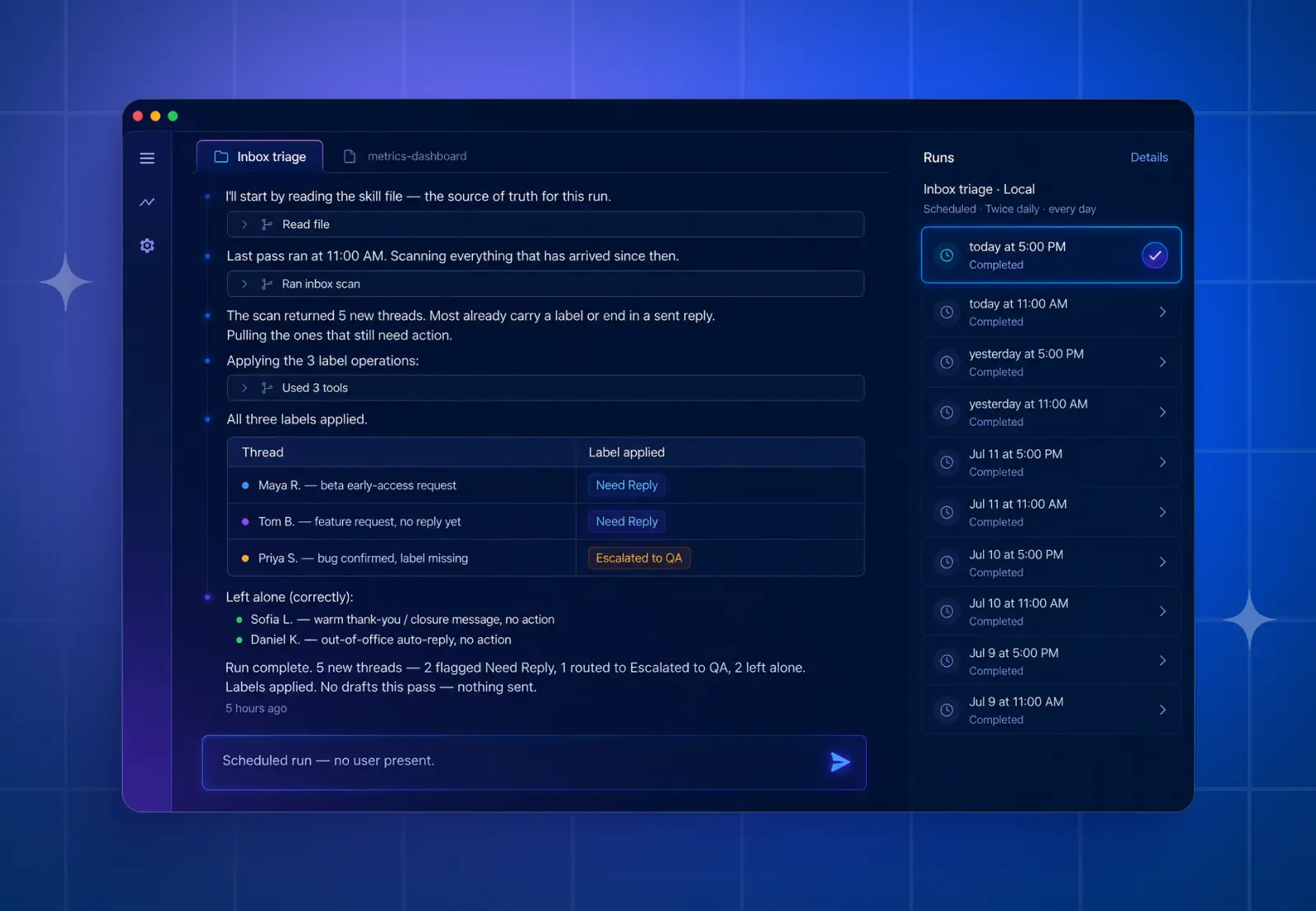
Artiom runs a sorting pass twice a day — once around eleven, once around five. The agent reads what's arrived since the last pass and does exactly what he used to do by hand.
It files each thread into the folder it belongs in — the same Need Reply, Demo Request, Escalated to QA folders he already used. It separates the fresh escalations from the conversations already in motion, so a new hand-off doesn't get buried under a thread he's halfway through. And it surfaces what actually needs a reply today, apart from what can wait.
He didn't throw out his taxonomy and learn someone else's. He described the rules he already followed — who handles what, what counts as urgent, what "Escalated to QA" really means — and the agent applies them.
"I didn't adopt someone else's system. I described the one I already had, and now it maintains itself."
So he opens his inbox and it's already organized. The morning that used to start with sorting now starts with the work.
Drafts in his unique voice
Most replies, Artiom still writes himself. The personal touch is the entire reason he works from his own mailbox, and most threads just need him and a keyboard. He doesn't hand everything to the agent, and he wouldn't want to.
But there are clear cases where he leans on his agent for draft support. When the queue is backing up and a customer has waited too long already. Or when a good answer means pulling together facts scattered across different places — a changelog, a help doc, two or three old threads, the right version number. The kind of reply where ten minutes go to gathering before he writes a word. That's where the agent earns its place.
He was skeptical about the voice. A generic AI reply is worse than no reply, and anyone who reads customer email all day can spot one: the stock phrases, the "Great question!", the stiff structure. So he taught the agent his voice, not a voice — the way he actually writes to customers. Warm, plain, answering only what was asked, no filler, correct Spark terms. When a Spark update is what fixes the problem, the draft leads with the update and the link instead of burying it under troubleshooting steps. Because that's what he would do.
"A generic AI reply is worse than no reply. So I taught it my voice, not a voice."
On those threads, the agent drafts the reply the way he'd write it, with the scattered facts already pulled in. He reads every draft, and he is the one who sends it. Nothing goes out on its own.
"The draft saves me the blank page. The judgment stays mine. So does the send button."
What actually changed
It didn't replace him. It removed the two things that used to eat his mornings: sorting the whole mailbox, and the slow fact-gathering on the replies where the answer lived in five places at once.
That time goes back to the threads that need a person. The upset customer. The tricky edge case. The beta user with a good idea worth talking through.
"It hasn't replaced me. It's removed the forty minutes of sorting before I could start helping people."
It contradicts conventional wisdom, but it’s true. Don't go looking for a better system. Describe the one you already trust, and let the agent keep it running. The categories that work are the ones you built around your own work. They don't need replacing. They need maintaining — the part you've been doing by hand.
Where to start
You can try this today on the inbox you already have. Read access in Spark CLI is free on every plan. It connects your agent to your mail, contacts, calendar, and meeting notes through Spark on your desktop, and it can read and organize context without sending anything or acting on your behalf. That covers everything that gave Artiom his mornings back.
When you're ready to automate more of the manual work — drafting, archiving, labeling, assigning across shared inboxes — Triage access does that, with you reading and approving before anything happens. It's included in Spark Pro.
The agent sorts. You do the work that counts.
Browse ready-made skills for Spark CLI at github.com/readdle/spark-cli-skills.