The conversation around AI agents exploded at the start of this year. And with it, a recurring theme: Agents need context, and most of the context that matters isn't stored anywhere you can query. It lives in decisions, exceptions, and the reasoning that connects one event to another — the information that used to live in people's heads and now has to live somewhere an agent can reach.
The interesting exception is email. It's the one place where years of decisions, relationships, open threads, contracts, and intros have been accumulating without anyone having to remember to write them down. For most professionals, it's the richest context store they own — and until now, almost entirely invisible to AI agents.
Spark CLI changes that. It's a command-line interface that gives AI agents access to your inbox, contacts, calendar, and meeting notes, reading from Spark Desktop's local data storage and working with every major email provider. We're launching with two access tiers from day one: Read is free for everyone, and Triage is included in every Spark Pro plan.
There's a neat symmetry here. The first emails were sent from a command line. The GUI came in the ’80s and has shaped how humans work with email ever since — toolbars, sidebars, clicks. Agents don't need any of that. They already know the commands. The command line was the interface email started with. It turns out it’s the one agents want too
One setup — every account
Spark CLI connects to every account you've added to Spark — Gmail, Outlook, Exchange, iCloud, Yahoo, and any IMAP or EWS account — and exposes them through a single interface. You can manage settings directly in Spark to set access and permissions for each account.
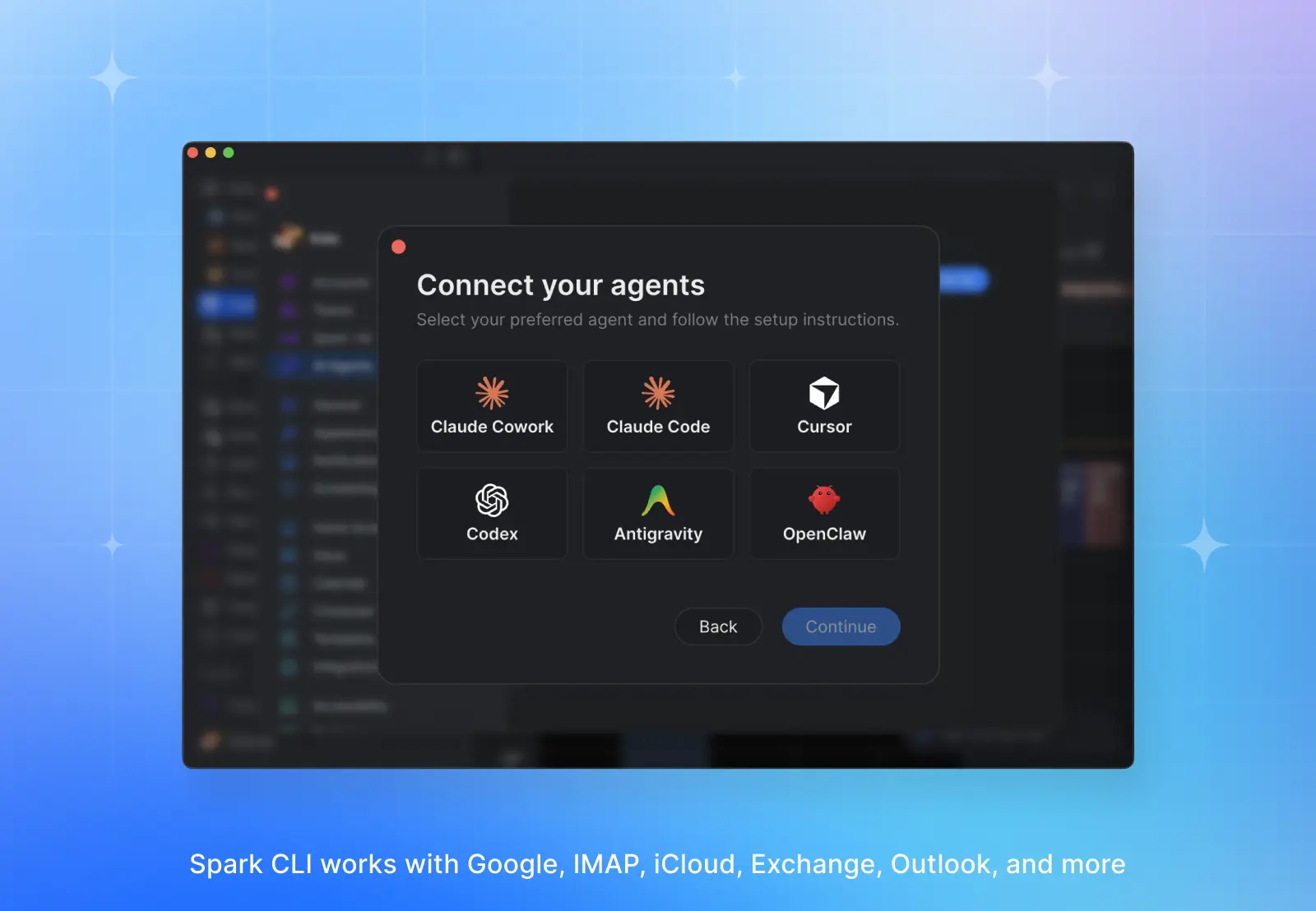
Connecting to your preferred agent is simple. We took a platform-agnostic approach, so Spark CLI works with platforms like Claude, Cursor, Codex, OpenClaw, Google Antigravity, and more.
Your data, your choice of model
Spark CLI reads from Spark Desktop's local data storage. That's a consequence of how Spark has been built and it's what makes the CLI possible in the first place.
That architecture means you get to choose the model. Point the CLI at Claude, GPT, Gemini — or local models from Ollama or LM Studio — and email content goes to that provider for processing.
Context, not just content
Most email connectors treat your inbox like a flat pile of text. The agent gets a list of message IDs and a search endpoint. From there, it has to read everything, work out who matters, and reconstruct context from scratch on every query.
That approach misses the most valuable thing in your inbox: the layer of judgement on top of your messages. Which threads you pinned because they mattered. Which conversations you marked as priority. That layer is the closest thing most professionals have to a captured record of how attention and decisions actually moved through their work over years.
Spark already indexes that layer. Spark CLI exposes it:
- Smart inbox and categories — Personal, Priority, Notification, Newsletter, Invitation — so the agent knows what's a real thread and what's a receipt.
- Pins and priority marks — the signals you've been using for years to flag what matters.
- Gatekeeper status — accepted senders versus blocked ones, so the agent doesn't waste a single token on spam you've already dismissed.
- Shared-inbox assignments — who owes a reply, who's handling what, what's still unassigned.
- Labels, threading, and contact relationships — everything that turns a flat mailbox into a working dataset.
That means you can ask your agent a general question instead of a keyword-perfect query and surface exactly what you need, fast. The model spends its tokens on the work, not on reconstructing context.
Semantic search runs on Spark's AI Assistant, so you'll need Spark +AI and the Assistant enabled to give your agent access to that richer context. (Inbox indexing happens locally and doesn't use any AI tokens in Spark.) Semantic search is subject to plan limitations — one month of history on Free, one year on Plus and Premium, unlimited on Pro — and raw keyword search is available to everyone with no history limit.
Read access: agents that know
Spark CLI currently comes with two permission levels: Read and Triage. Read access is available across every Spark plan. It gives your agent safe, read-only access to your mail, contacts, calendars, and meeting notes — it can’t send messages or take action on your inbox.
Once an agent can see the context your inbox has been compiling, you get answers to questions no system of record holds. "What did we decide about pricing in the thread with Acme last month, and who was on the call?" Your agent pulls the thread, names the participants, finds the meeting where the decision closed, and summarizes what was agreed.
Read mode is where the 'living wiki' and 'second brain' use cases become practical. Decision logs, stakeholder briefs, meeting prep, reconstructing project history — the work that used to require an hour of scrolling and three Slack pings now runs in a single prompt. And because the CLI composes with whatever other connectors your agent has, the inbox stops being a dead end and becomes a research surface your agent can work across.
Kate from the marketing team uses Spark CLI to prepare for upcoming meetings. She uses Cursor to check past meeting notes and conversations to create crisp agendas that drive projects forward. Meetings, summaries, and related materials are kept in a private repo so that she can keep a running log of all projects and quickly turn discussions into action plans and collateral.
Triage access: agents that act
Triage, included in Spark Pro, extends what Read can do by adding the ability to act on what the agent surfaces. Your agent can:
- Prepare messages: Your agent can draft, reply, forward, and edit messages with full formatting.
- Organize your inbox: It can archive, label, pin, snooze, and move threads.
- Delegate responsibility: It can assign and reassign items in shared inboxes.
- Run bulk operations: It can do everything above, across multiple emails and accounts.
Triage is where the agent stops observing and starts doing the work. A morning prompt like "archive every notification older than a week, draft replies to the three customers who've been waiting longest, and assign the two support threads to Maria" runs in one pass. The time each day that used to go toward sifting and sorting goes back to you.
Sergey at ZAS Ventures runs the fund's deal flow through Spark CLI's Triage. After every founder call he tells Cursor to draft a CRM-ready recap, archive the closed thread, assign open action items to the right partner, and queue a reply to the founder with the agreed next step. A forty-minute call closes out in the time it takes to drink a coffee.
Browse a curated library of skills
Spark CLI ships with a library of ready-to-use skills — templates that your agent can run to help surface, summarize, or act on what's happening in your inbox. Use them as-is, modify them to fit your needs, or create new ones that compose into multi-tool workflows.
Read-only skills
- Morning standup: Generate a daily briefing with the day's events, unread emails from people and priority senders, and open team assignments.
- Meeting prep: Go into your next meeting fully prepared. Use past emails and meeting notes to draft an agenda with open topics worth raising.
- Stakeholder brief: Create a dossier on colleagues or clients by reviewing previous meetings and exchanges to generate a detailed overview.
- Decision tracker: Reconstruct the decision history for a topic by cross-referencing meeting transcripts and past email threads.
Triage skills
- Executive assistant: Turn Spark CLI into your personal assistant. Spotlight the day’s events and important messages that need attention, then help draft follow-ups and schedule meetings.
- Notification hygiene: Reclassify noisy senders, group repetitive notifications, and bulk-archive cleared alerts.
- Priority tuning: Audit and rebalance Priority Senders in Spark so only the most important conversations appear at the top of your inbox.
- Founder: Go Founder Mode on your inbox — triage, delegate, and oversee team activity, and hone in on the emails and invites that absolutely can't wait.
You can browse the full list of skills on GitHub and follow the repo for new updates.
Get started with Spark CLI
Spark CLI requires Spark Desktop running locally on your Mac or Windows computer. Update to the latest version, navigate to Settings→AI Agents to follow the setup instructions.
If you’re already using agents to work with your docs and communication tools, Spark CLI completes the missing layer. Your inbox is the knowledge base you've spent years compiling without trying. Your agent should finally be able to read it.
 The Readdle Team