The client meeting went well. Good discussion, clear action items, and the clients’ faces betrayed real relief when you said they’d have the proposal by Friday.
But now it's Thursday, and the proposal isn't sent. It’s fine — your AI meeting notes exist — but you’re sitting down to draft the proposal, and you can’t remember if the client wanted twenty licenses or twenty-five. The answer exists, transcribed, timestamped, and searchable. But it’s on some start-up’s servers, in an entirely different tool from your email, your calendar, and your draft proposal.
You’re running up against a classic productivity problem, resurrected for the AI age: too many tools mean more gaps and dead ends into which information can drift. In this case, the gap isn’t remembering what was said — you diligently captured that. It’s connecting what was said to what needs to happen next.
Why AI meeting notes aren't the real problem anymore
The market for an AI meeting note taker has exploded over the past two years, and the tools have gotten genuinely good. They transcribe accurately, identify speakers, summarize discussions, and extract action items (even in a foreign language). Transcription is largely a solved problem.
But for professionals whose meeting outcomes have email consequences — sales reps sending proposals, account managers coordinating deliverables, support leads looping teams in — the chance for error hasn’t disappeared. It’s just shifted. There’s no longer a real reason to ask, "What did we agree to?" But it’s still all too real to fret, "Did the thing we agreed to actually get done?"
This is the meeting-to-action gap: the space between captured action items and completed follow-through. And where mere notes can fail, a better meeting notes workflow can help.
Where work falls through the cracks
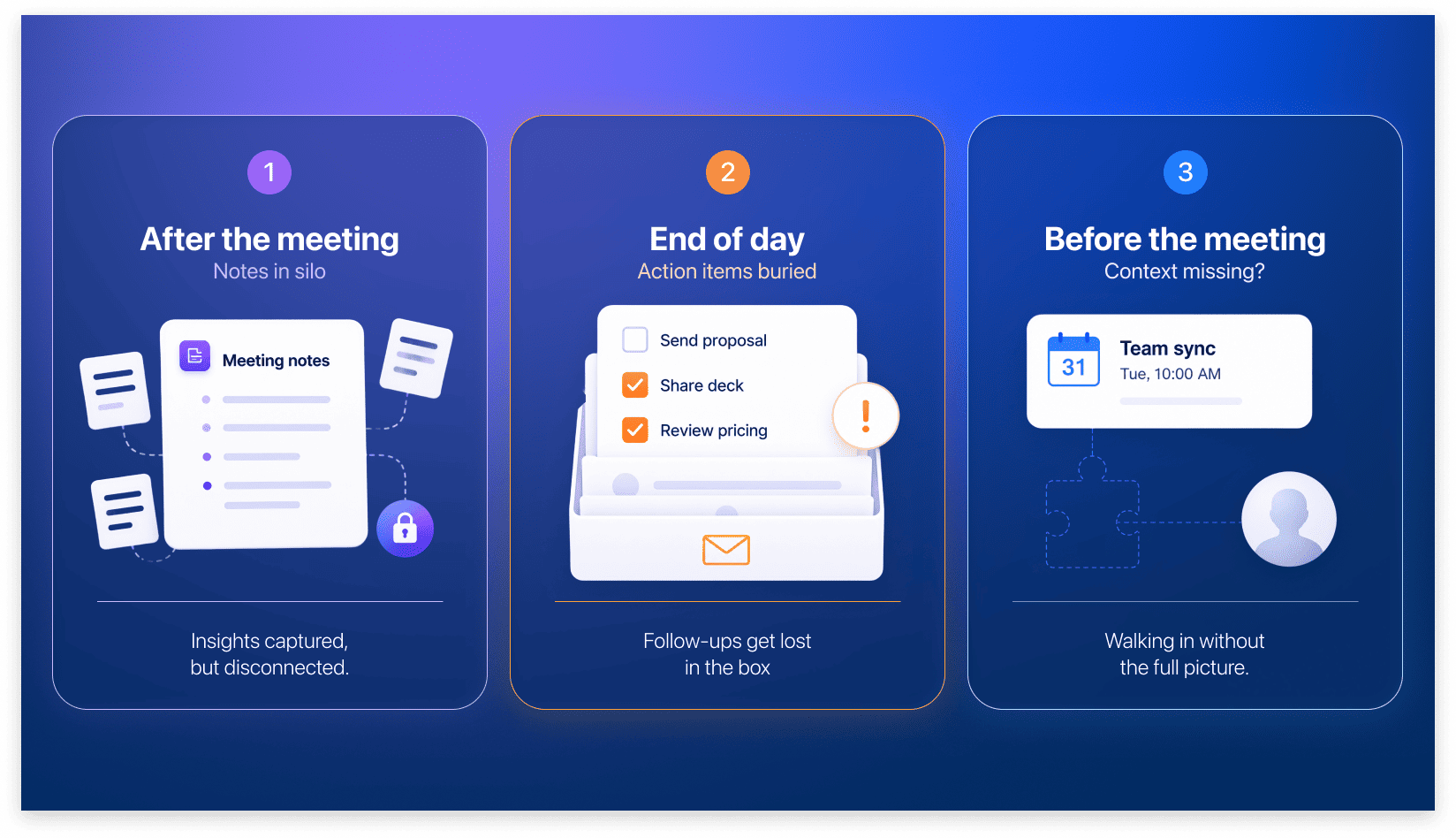
Meeting-to-action gaps tend to open up at three key moments:
- After a meeting, when meeting notes get stored away from the email thread that started the conversation, and action items fade from memory.
- At the end of the day, when meeting follow-up items get dropped because nothing appears on your to-do list, on your calendar, or in your inbox.
- Before the next meeting, when the context you need about previous discussions or commitments isn’t at hand, leaving you unprepared.
Using the mere fact of having notes as a preparation strategy in these moments is like relying on the mere fact of owning a textbook as an exam strategy — information has to be integrated — to you, to your systems — in order to be useful. Existing isn’t enough. Incorporating AI meeting notes into your work life and closing these gaps involves a more sophisticated strategy than simply sending a bot off to do grunt work no one will ever read, as if it were some ignored intern.
This is where AI agents like Claude Code and Codex can help. You can use them to execute workflows in tools like Spark, connecting meetings to where your day-to-day actually happens (your inbox and calendar), and the skills pre-built into Spark CLI make it simple.
Three scenarios where AI agents can close the gap
Scenario 1: Take care of follow-ups after the meeting
The problem: As good as AI meeting notes can be, they don’t count for much if they aren’t acted upon. If they describe what was agreed but don't eventually end up as action items, chances are tasks will disappear into a digital junk drawer.
The solution: Using Spark CLI and Spark +AI meeting notes, let your agent extract action items, decisions, and follow-up commitments from the full transcript of meeting notes. The agent can then draft reminders you can easily send to the relevant attendees.
The skill: In Spark CLI, the skill [mono: recipe-meeting-followup] reviews meeting transcripts, extracts action items, and drafts follow-up emails to relevant attendees. If you had an hour-long meeting with eight people, and only two of them got any to-dos from it, this skill scans the transcript and sends follow-ups free from unnecessary bulk, closing the loop on things like:
- The agreement to pull the most recent churn data (Natasha from Analytics)
- Plans to update Figma files based on customer feedback (Walter from Design)
The result: To-dos don’t languish in a specific AI meeting note taker and instead appear in the relevant inboxes, every time.
Scenario 2: Close the day with a follow-through review
The problem: You’ve set up your agent with the follow-up skill, and it extracted three action items from your morning meeting and dutifully sent them to your inbox. But it was a busy day, and by 6 p.m., you have fifty new messages burying your reminder.
The solution: At the end of each day, let your agent sift through your inbox, calendar, and meeting notes to flag any items that remain outstanding.
The skill: Spark CLI’s skill [mono: recipe-end-of-day] instructs your agent to review the action items from the day's meeting notes alongside your inbox status, catching loose ends before they unravel your schedule. The skill will tell you, for example, that there are three emails awaiting reply, two client calls tomorrow that need prep, and one pinned email listing tasks still open.
The result: Nothing falls through the gap between "We decided" and "It's done."
Scenario 3: Pull context before the meeting
The problem: Your calendar has been a brick wall of back-to-back meetings all day, and now you’re walking into a 2 p.m. with your biggest client. Problem is, you’re totally fatigued from the marathon schedule and can't remember the pricing terms you agreed to in an email two weeks ago. You scroll through your inbox during small talk, hoping nothing important comes up in the first three minutes.
The solution: Before the meeting starts, pull every email thread with the attendees, the proposal you last sent, and any calendar events and meeting notes from previous discussions. The context will help you look and feel put-together. It’s curated for you, and you don’t waste time hunting information down in separate tools.
The skill: Spark's [mono: recipe-meeting-prep] skill handles this exact workflow, collecting relevant context so you’re well prepared. It lets your agent look at your upcoming meeting and identify the attendees, surface the related email history, and find previous calendar events before putting it all in one view. You walk in knowing exactly where the conversation left off.
The result: Preparation that takes two minutes instead of fifteen, no scrambling required.
A simple test for your current setup
With AI agents, workflows matter, because workflows are what extract relevant information that would otherwise languish in separate tools.
With AI note takers, the important question is no longer “Is anyone taking notes?” but “Am I sure the meeting outcomes and follow-ups are in places where they’ll get the necessary attention?” For professionals that work heavily with email and meetings, that means appearing alongside your calendar and inbox so you can:
- Connect meeting notes to related emails and ongoing threads instead of letting them sit in isolation
- Review action items from meetings instead of assuming you’ll perfectly remember what happened during the workday
- Pull context like email history, previous commitments, and calendar events before the big meeting instead of relying on memory
The key question for professionals working in email is: Can I see meeting outcomes and email follow-ups in the same place, or is my workflow erecting unnecessary barriers? If the answer to the question is “Barriers,” the meeting-to-action gap is open. The workflows above are how you close it.
Why this matters more than picking the "best" tool
A lot of comparisons written about choosing an AI meeting assistant focus on rankings and features — best transcription accuracy, best speaker identification, best summary quality. These comparisons miss the point.
For email-dependent professionals, the tool that captures meetings perfectly but stores them in isolation from the inbox is worse than the imperfect tool that integrates.
These perfect-but-disconnected tools can have costs: missed proposals, dropped follow-ups, forgotten commitments. A meeting notes tool that sits in its own silo takes up time at best and functions as a junkyard at worst. Using an AI note taker that works where you do ensures notes spur the action they’re meant to initiate.
The question, then, isn't which AI meeting note taker has the best transcription. It's which one can keep your meeting context connected to your email workflow.
The bottom line
AI meeting notes solved transcription. But transcription turned out not to be the problem.
The problem is the same one humans face at every level of technological development: following through on decisions and commitments; closing the gap between what’s agreed on and what gets done. If the connection between them lives only in your memory, the chance of the gap opening up is always there.
For sales reps, account managers, and anyone whose meeting outcomes have inbox consequences, the workflows that close that gap aren't a nice-to-have. They're the difference between a productive week and a week of dropped commitments.
Fortunately, Spark’s AI meeting notes and powerful, pre-built agentic workflows fill in the cracks where work would otherwise disappear.
 The Readdle Team