The professional world is all about finding the right people to connect with. But often it's way more crucial to follow up with those people to actually close the deal, sign the contract or establish a partnership.
This is why we added Send Later and Follow-up Reminders in Spark, so you can reach the recipients at the best time with a relevant message. No need to use all kinds of workarounds or extensions in your email. It all works seamlessly out of the box in Spark.
Getting more replies starts with the first email: how long it is, how it's written and what it asks for. Then comes following up, where the key is to be mindfully persistent. Below are nine tips covering both, each backed by data from studies of millions of emails, starting with what a good response rate actually looks like.
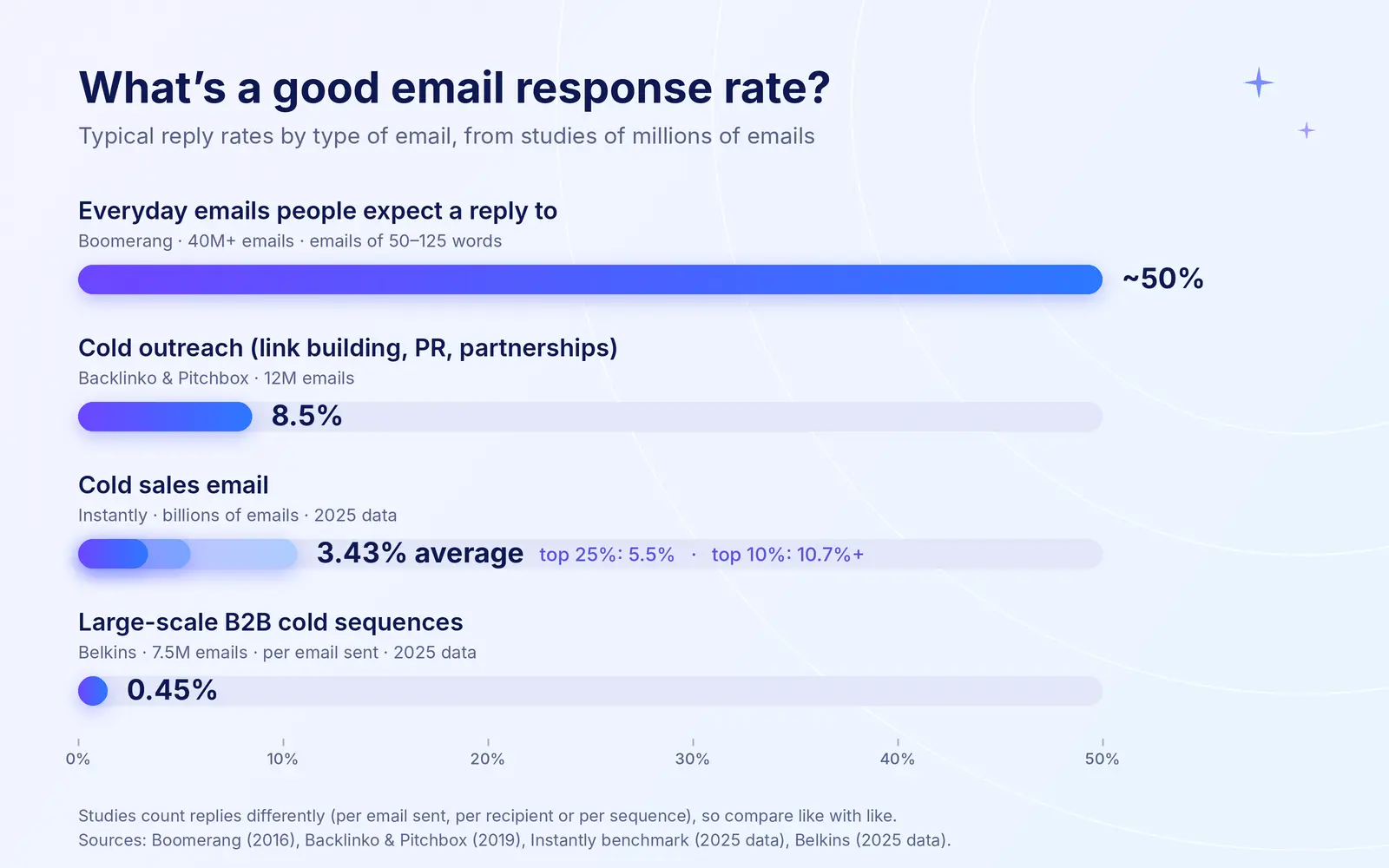
What's a good email response rate?
It depends heavily on who you're emailing and whether they expect to hear from you. Studies also calculate response rates differently (per email sent, per recipient, or per sequence), so compare like with like.
|
Type of email |
Typical response rate | Source |
| Everyday emails people expect a reply to | About 50% for emails of 50–125 words | Boomerang, 40M+ emails (2016) |
| Cold outreach (link building, PR, partnerships) | 8.5% | Backlinko and Pitchbox, 12M emails (2019) |
| Cold sales email | 3.43% average; 5.5% top quarter; 10.7%+ top tenth | Instantly, billions of emails (2025 data) |
| Large-scale B2B cold sequences | 0.45% per email sent | Belkins, 7.5M emails (2025 data) |
For a quick check of your own rate, divide the number of replies by the number of emails delivered and multiply by 100. If your work emails get answered less than half the time, or your cold emails sit below about 3%, the tips below are where to start.
Why emails go unanswered
Most unanswered emails aren't rejections; they're casualties of a crowded inbox. Microsoft's 2025 Work Trend Index found the average worker receives 117 emails a day and skims most of them in under a minute. Including chats and meetings, people are interrupted about every two minutes of the working day, and 40% of workers are already checking email by 6 a.m.
Write emails people want to answer
1. Keep it short and get straight to the point
The last thing you want to do is overwhelm the recipient with even more emails. Keep your email (especially the subject line) short and sweet, cut straight to the point and explain why you're reaching out.
The data is clear on this. Boomerang analyzed responses to more than 40 million emails and found emails of 50–125 words got response rates above 50%, falling to about 44% at 500 words. Subject lines of three or four words got the most responses. In cold sales email, Instantly found the best-performing campaigns keep first emails under 80 words.
DON'T: Hey John, thank you for taking the time on Monday to meet with me at the Starbucks. It's been a while since I visited San Francisco, and I really enjoyed catching up with you on what you and your team are working on. I think your idea is solid, and there is so much potential for it. I can't wait to see the next update. With that being said, please let me know in advance about the release, so that our team can get on the private beta too.
DO: Hey John, great catching up with you on Monday. I really like the product your team is working on. We'd really appreciate it if you could give us access to the beta, so that we can test it too.
For more on writing to people with packed inboxes, see our guide on how to email busy people.
2. Write as you talk
Simple writing gets more replies.
In Boomerang's study, emails written at a third-grade reading level (short sentences and everyday words) got 36% more responses than emails written at a college level, and 17% more than those at a high school level. That doesn't mean writing down to people; it means removing anything that makes them work to understand you. Word processors and many email apps can show the reading level of a draft.
3. Make it actionable
It's pointless to email someone without a clear reason. People follow up to remind others about things they might have forgotten, but which are often important for both sender and the recipient. You can help the recipient with that by outlining what is expected of them.
DON'T: "There is a design proposal we've reviewed as a team last week and it turns out there are some changes that we need to make before sending it for review."
DO: "Please review the comments in the design document that were assigned to you, and once you're ready, forward it to the design lead."
Ask a question, but not too many. Boomerang found emails asking one to three questions were 50% more likely to get a response than emails asking none. Instantly's top performers go further, using a single, simple call to action, often a yes/no question. Adding a deadline helps too.
4. Make it about them
Generic emails are easy to ignore. In Backlinko and Pitchbox's study of 12 million outreach emails, personalized subject lines got 30.5% more replies, and emails with a personalized message body got 32.7% more. Personalizing doesn't mean flattery: one specific reference to their work, their company or your last conversation is enough.
5. Send your email to the responsible person
If you don't get a reply after 2–3 follow ups, it's always tempting to go over your contact person's head to get something done, or write to various members of the same team. This might not only be considered annoying, but also rude and should be used only as a last resort. Good email etiquette is to ask your contact first whether someone else is better placed to help, and to check you're writing to the right person before your first email.
6. Send it when people are answering email
Timing affects replies, not just opens. In Belkins' 2025 study of 7.5 million cold emails, emails sent between 8 a.m. and noon got the most replies, and Wednesday and Thursday were the best days. Instantly also saw replies peak midweek, on Wednesday. Our guide to the best time to send emails has the full data. Write whenever suits you, then schedule it with Send Later to arrive at the start of their working day.
Follow up the right way
Even a well-written email can get buried. Following up is where many replies come from, and for ready-made wording, see our follow-up email templates.
Follow-ups double replies: in Backlinko and Pitchbox's study of 12 million outreach emails, sending follow-ups roughly doubled the average response rate.
1. Always make a recap
Instead of sending an annoying 'Just following up' message, do a quick recap of your original message with what's most important about it — help the recipient immediately understand what you expect from them.
Executive coach Rebecca Zucker warns in Harvard Business Review that vague check-ins can "make the reader feel bad for being slow to respond," which only delays the reply further. A recap gives them everything they need to answer straight away.
DON'T: Hi John, just following up on my Monday message to see if you had a chance to read it. I've outlined all of the details in the previous email, so that you could get a better idea of the project.
DO: Hi John, I know your inbox is busy; I just wanted to quickly recap my Monday message re: design proposal review for a new client. To move forward with this, we need to approve it with the marketing team on Thursday this week (more details in the previous email).
Send the recap as a reply in the same thread, so the original message sits right below it in their conversation view.
A big share of replies come from follow-ups: in Belkins' 2025 data, follow-ups brought in 58.6% of all replies, and the third email booked more meetings than the first two combined. Instantly's 2025 data puts the follow-up share lower, at 42%, but in both studies stopping after one email would have lost a large part of the replies.
2. Be consistent with your follow-up strategy
Bombarding others' email inboxes with follow-up messages every day will only make it worse. Instead, have a follow-up strategy depending on how long the person hasn't gotten back to you.
Steli Efti shared his follow-up frequency strategy on Close's blog as well as some additional advice on follow-up. The general rule of thumb is that you should be following up less frequently the longer it takes the person to get back to you.
Efti, co-founder of the sales platform Close, is famously persistent. "My follow up strategy is binary so I follow up until I get a reply," he told Mixergy. But he applies that only to people he's already had some contact with, and he spaces follow-ups out for busy people: with a senior executive, he suggests waiting four to seven days before the first one.
If you are trying to get a hold of investors, but they never got back to you after your first email, you might just follow up with them once a month with the most recent progress updates on your project.
For everyday work emails, three to five working days is a sensible first gap. Instantly found three to four days between touches worked well for cold sequences.
Learn more: How to write a follow up email after a meeting
3. Know when to stop (or switch channels)
Persistence works, but it has limits that depend on the relationship. For favors and requests to people who haven't engaged yet, workplace advice writer Alison Green of Ask a Manager suggests "you can do between two and three messages without an answer" before moving on.
Sales outreach can go further.
Belkins found three to five emails is the practical limit, and Instantly puts the sweet spot at four to seven, with each adding something new. "Step 3 is not a formality," writes Belkins co-founder Michael Maximoff, who recommends a fresh angle rather than a copy of the first email. After that, switching channels beats sending more email: Belkins saw reply rates above 7% on LinkedIn, compared with under 1% for cold email.
Master the art of the follow-up with Spark
Every successful follow-up has two components to it: right timing and email content. Spark helps with both. Its AI Assistant can help you draft and shorten an email, and Spark becomes your proactive assistant which always reminds you to follow up on time.
With Reminders to follow up, Spark becomes an indispensable email tool for professionals who value their time.
Just before you hit send on your next email, add a reminder to follow up with a person if they don't get back to you in the next few days. That's it; you might as well forget about that email, but Spark will remember. And in case no one gets back to you, Spark will bring that email into your Inbox so you'll follow up on time and close that deal!
Summary
Professional follow-up is an art that will be appreciated by the recipient if done properly. And you can only master the skill with ongoing, deliberate practice. So download Spark for free and start following up right away. Spark is taking care of the routine things, so that you can focus on doing work you enjoy.